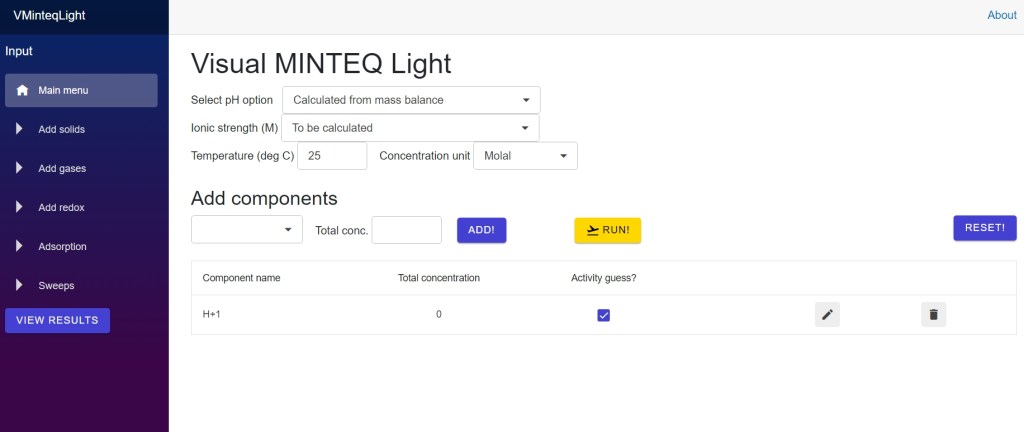
Visual MINTEQ Light is a Blazor WASM web app that contains the most basic options of Visual MINTEQ. This makes it possible to use Visual MINTEQ also if you do not have a desktop computer with Windows – you can use it also on your smartphone! With Visual MINTEQ Light you can:
- Perform speciation calculations with a scaled-down version of Visual MINTEQ’s default thermodynamic database, with or without the presence of solids and gases at equilibrium
- Calculate the expected element speciation as a function of pe/redox potential
- Calculate adsorption and organic complexation with some of the most common models used in the desktop version of Visual MINTEQ
- Perform sweeps where one parameter (e.g. pH) is varied
- Print results to a text file in the Downloads folder that can be read by a spreadsheet program (e.g., Excel) (this option is not enabled for smartphones).
Visual MINTEQ Light has a number of limitations in relation to the desktop version, some of the most important ones include:
- Input files cannot be read or saved
- Only a limited number of components are included, e.g. only very few organic components, actinides and rare-earths
- The databases cannot be edited
- Multi-problem options other than sweeps (e.g., titrations) are not enabled
- Activity corrections are always made using the Davies equation (meaning that you should not use the app for ionic strengths higher than about 0.5 M)
- The activities of species other than components cannot be fixed
- In problems that involve an adsorbent or a solid phase, total dissolved concentrations can only be fixed for adsorption problems (for smartphones they cannot be fixed at all)
- The Biotic Ligand Model is not included
Since Visual MINTEQ Light works the same way as the desktop version, you can use the same user guide even though the menus look a little different!
Visual MINTEQ Light was last updated on 8 July 2024.
 Visual MINTEQ